install

One line. Drops cleanly into your homelab.

The installer drops a systemd-managed hal0-api on port :8080, probes your hardware, writes a config file at /etc/hal0/, and prepares the five built-in slots (primary, embed, stt, tts, img). Linux + systemd required. Non-interactive and idempotent.

one-line install
sh
curl -fsSL https://hal0.dev/install.sh | bash

Runs as root via sudo. Read the script first if you haven't yet: installer/install.sh.

where to install it

Three deployment shapes.

hal0 wants Linux + systemd. Past that, run it wherever your homelab keeps its other tenants. The canonical shape is a privileged LXC on a Proxmox node with GPU/NPU passthrough and AppArmor set to unconfined. Bare metal works too. A VM works if you pin CPUs.

canonical

Proxmox LXC + passthrough

A privileged LXC with GPU/NPU passthrough is the shape hal0 was written against. On Strix Halo the working recipe is privileged + AppArmor unconfined + dev0–dev3 + cgroup allows for the render nodes and the XDNA accelerator. Boots in seconds, snapshots cheaply, and the dashboard's memory bar accounts for other PVE tenants competing for the same physical RAM pool.

  • privileged + apparmor unconfined
  • iGPU / dGPU / NPU passthrough
  • PVEAuditor token plumbing

also good

Bare metal

A Linux box with systemd, the GPU/NPU drivers loaded, and a spare 20 GB under /var/lib. The installer does the same work it does inside an LXC. No host-pressure segment in the memory bar because there's no other tenant to account for.

  • CachyOS / Arch / Ubuntu / Debian
  • Vulkan / ROCm / CUDA
  • single tenant

works with care

VM (KVM / QEMU / Hyper-V Gen2)

A full Linux VM honours systemd and works as soon as the installer finishes. Pin CPUs for the inference workload or the scheduler will eat your tok/s; passthrough the GPU with vfio-pci if you want anything past CPU-only. Bigger memory overhead than an LXC for the same workload.

  • CPU pinning recommended
  • vfio-pci for GPU
  • heavier than LXC

fits the rest of your stack

One public port (:8080) and an optional :3001 for the bundled OpenWebUI. Sits behind Traefik or Caddy cleanly: add hal0.lan (or whatever subdomain your gateway already routes) and you're done. Model store at /var/lib/hal0/models is a plain directory. Mount it from your NAS over NFS, point a fresh install at it with --models-dir=/srv/models, swap backends without re-pulling.

Unified-memory bar from the hal0 dashboard, showing segments for GTT inference, system RAM, the Proxmox host's other tenants, and free memory
Memory bar inside an LXC. Plug a read-only PVEAuditor token in and the Proxmox host segment shows what the rest of the node is eating (other tenants, ZFS ARC, kernel) instead of just the cgroup slice. Bare-metal and VM installs leave the panel off.

new in 2026-05-15

Installer overhaul.

The install path was hardened end-to-end this cycle. ASCII banner + step counter + spinners up top; structured pre-flight checks you can re-run any time with hal0 doctor; hardware cards + a pre-populated slots/primary.toml based on what was detected; contextual recovery hints on failure; optional auth round-trip + a live "hello" + a QR for the dashboard URL at the end.

pre-flight

Extracted & re-runnable

installer/lib/preflight.sh gates systemd, Python 3.11–3.14, disk (≥ 20 GB under /var/lib), and port collisions (:8080, :3001) before any apt/pip work.

probe

Hardware cards

After the venv lands, the installer prints four single-line hardware cards via format_cards() in src/hal0/hardware/probe.py and writes /etc/hal0/hardware.json.

slot defaults

Auto-populated primary

recommend_primary_slot() picks the largest curated chat model that fits and renders slots/primary.toml with enabled = false waiting for a model pull. Operator-edited files are never overwritten.

recovery hints

Contextual ERR trap

A trap … ERR in install.sh catches non-zero exits and prints the failing step plus a focused hint (disk full, missing build deps, blocked port, or a stale venv) instead of dumping a raw bash trace at you.

finish

Live hello + QR + reachability

A live "hello" prompt streamed through the freshly-spawned slot, a QR code for the dashboard URL rendered with qrencode -t ANSIUTF8 when available, and a reachability summary box on exit.

PATH

hal0 on PATH automatically

Idempotent ln -sfn ${VENV_DIR}/bin/hal0 /usr/local/bin/hal0 during the CLI install step. No manual export, no source /etc/profile.d/hal0.sh. Override the link target with HAL0_PATH_LINK; skipped in --dev and removed by uninstall.sh.

existing models

--models-dir=PATH

Point a fresh install at an existing model store at provision time. Resolution order: explicit flag → HAL0_MODELS_DIR env → interactive tty prompt → /var/lib/hal0/models default. Persisted as [models].pull_root and added to [models].roots so the tree scans on first boot.

first-run wizard

Eight linear steps

Password → hardware + storage → primary chat model → capabilities (embed / voice.stt / voice.tts / img with smart defaults; rerank as a sub-disclosure) → conditional HF token (only when a selected model is gated) → license acceptance → parallel install with retry-per-row → done. Replaces the legacy 5-step picker and three IA prototypes.

re-run the pre-flight any time

hal0 doctor shells the same installer/lib/preflight.sh the installer sources, so you can audit a live host without re-installing.

hal0 doctor
sh
hal0 doctor

Flags: --plain forces ASCII output for log capture, --ports "8080 3001 8186" tunes the port collision check. Exit code matches the script's so it composes with shell tooling (hal0 doctor && hal0 status).

Sibling subcommand: hal0 capabilities migrate [--dry-run] walks capabilities.toml and snaps illegal (backend, model) pairs to the model’s first legal backend; selections whose model is gone get cleared. Idempotent.

What the installer does.

The script is non-interactive. Every step is overridable by an environment variable so the same command works in CI, in a VM, and on your daily driver.

Step by step (click to expand)
  1. Preflight. Refuses to run on anything that isn’t Linux with systemd (installer/install.sh:86). Checks for python3, curl, systemctl, and a writable prefix.
  2. User & directories. Creates a system hal0 user and the FHS layout: /usr/lib/hal0/current/ (atomic symlink to a versioned dir), /etc/hal0/ (config, preserved across updates), /var/lib/hal0/ (models, registry, OpenWebUI state).
  3. Python venv. Builds the hal0 venv at the versioned dir and pins dependencies. Override the interpreter with HAL0_PYTHON=/path/to/python3.12.
  4. Hardware probe. Runs HardwareProbe().probe(), writes /etc/hal0/hardware.json, prints four hardware summary cards via format_cards(), and renders /etc/hal0/slots/primary.toml with a recommended backend + curated model via recommend_primary_slot() if no primary file exists. Skip the whole step with HAL0_NO_PROBE=1.
  5. systemd units. Installs hal0-api.service plus the hal0-slot@.service template. One template, N slot instances. No hand-written per-slot units.
  6. OpenWebUI wiring. Writes openwebui.env with OPENAI_API_BASE_URLS=http://127.0.0.1:8080/v1 so the bundled chat UI lights up at :3001 with zero extra config.
  7. Enable & start. systemctl enable --now hal0-api. Slot units stay offline until you assign a model in the dashboard or via hal0 slot load.

Overrides accepted on the command line: HAL0_PREFIX, HAL0_PORT (default 8080), HAL0_USER, HAL0_PYTHON, HAL0_NO_PROBE, and per-backend HAL0_TOOLBOX_IMAGE_* overrides for pinning a specific Vulkan/ROCm/FLM/Moonshine/Kokoro image.

Manual install.

Prefer reading the script before running it? Clone the repo and run the installer directly. Same code path, no curl | bash.

  1. Step 1: Clone the repo

    sh
    sh
    git clone https://github.com/hal0ai/hal0.git
    cd hal0
  2. Step 2: Run the installer

    sh
    sh
    sudo bash installer/install.sh

    The same script the one-liner downloads. All HAL0_* environment overrides apply here too:

    sh
    sh
    sudo HAL0_PORT=18080 HAL0_NO_PROBE=1 bash installer/install.sh

    Point it at an existing model store with --models-dir=<abs path> (must be absolute; equivalent to HAL0_MODELS_DIR):

    sh
    sh
    sudo bash installer/install.sh --models-dir=/srv/models
  3. Step 3: Pick a model

    hal0 model pull drives the same HF download path the FirstRun wizard uses. For the moment, drop a GGUF file into /var/lib/hal0/models/ and point a slot at it:

    sh
    sh
    sudo cp ~/Downloads/Qwen2.5-0.5B-Instruct-Q4_K_M.gguf \
      /var/lib/hal0/models/
    hal0 slot load primary --model qwen2.5-0.5b-instruct-q4_k_m

    Qwen 0.5B is the CI smoke model. It fits anywhere and verifies the slot lifecycle end-to-end (217–413 tok/s on Strix Halo iGPU, plenty fast on CPU for a sanity check).

Verify the install.

Three checks: CLI is on PATH, the daemon is running, the API is responding.

  1. Step 1: hal0 --version

    cli
    sh
    hal0 --version

    Expected:

    expected output
    txt
    hal0 0.1.x

    If the binary isn’t found, /usr/lib/hal0/current/bin probably isn’t on your PATH. Log out and back in, or source /etc/profile.d/hal0.sh.

  2. Step 2: systemctl status hal0-api

    daemon
    sh
    systemctl status hal0-api

    Expected (the key bits):

    expected output
    txt
    ● hal0-api.service - hal0 OpenAI-compatible API
         Loaded: loaded (/etc/systemd/system/hal0-api.service; enabled; preset: enabled)
         Active: active (running) since ...
       Main PID: 12345 (python)
          Tasks: ...
         Memory: ...
            CPU: ...

    Active: active (running) is the line that matters. Logs are in journalctl -u hal0-api.

  3. Step 3: curl /v1/models

    api
    sh
    curl http://localhost:8080/v1/models

    Expected (empty registry on a fresh install):

    expected output
    json
    {
      "object": "list",
      "data": []
    }

    After you load a model into a slot you’ll see it in data[]. The dispatcher exposes the OpenAI surface at /v1/*: chat, completions, embeddings, rerank, audio transcription, audio speech. Slot ports (:8081:8099) bind 127.0.0.1 only; the API is the single public surface.

  4. Step 4: Optional: open the dashboard

    The Vue dashboard ships on the same :8080 at /; OpenWebUI is on :3001 prewired against the local API.

    local urls
    sh
    # dashboard
    xdg-open http://localhost:8080/
    
    # prewired chat
    xdg-open http://localhost:3001/

what you get after installing

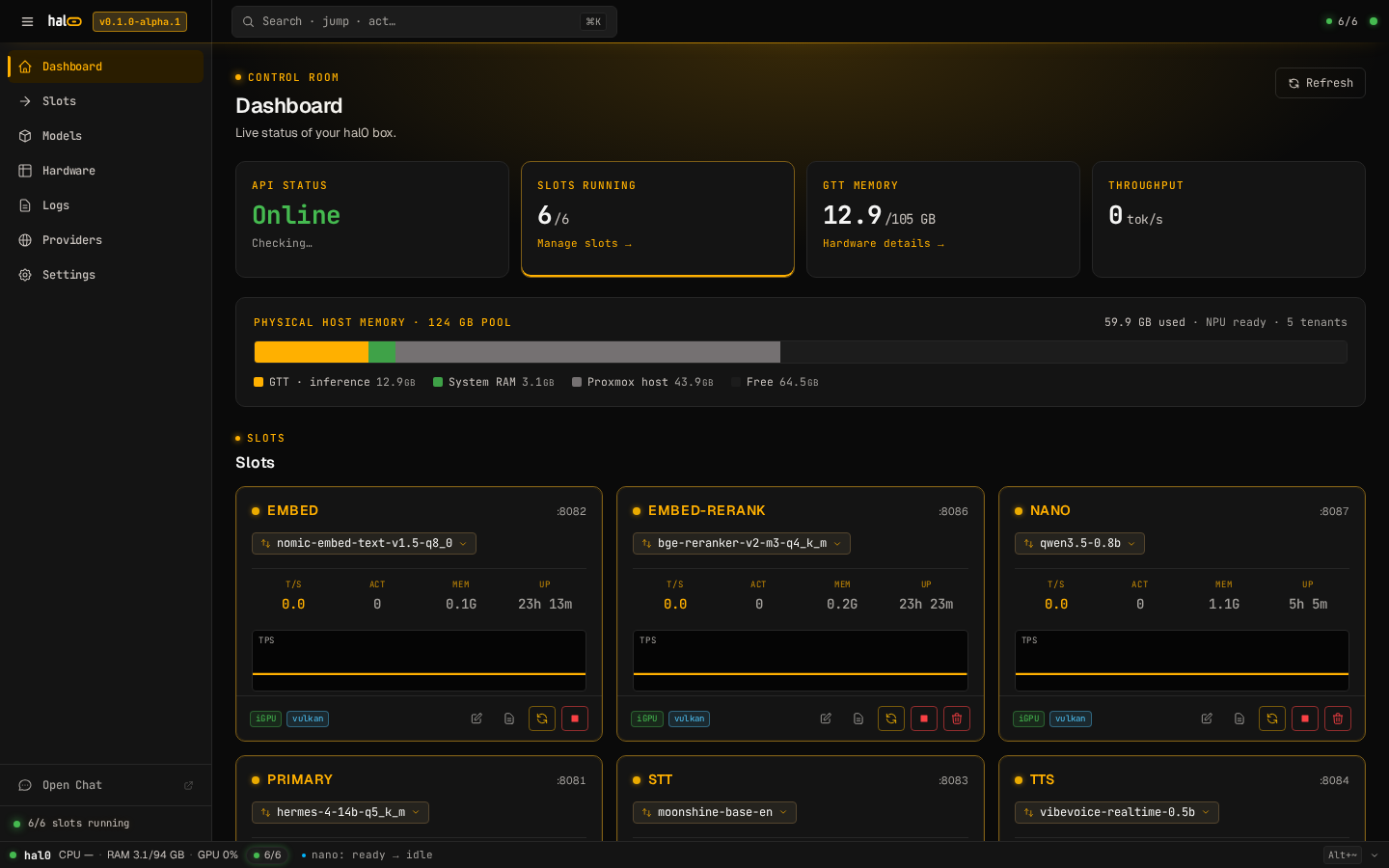
hal0 dashboard at /: KPI row (API, Slots, Memory, Throughput), the unified-memory bar with GTT/System/Proxmox-host/Free segments, and the slot grid
Dashboard at /. KPI row up top (API / Slots / Memory / Throughput), unified-memory bar with a Proxmox host segment for co-tenant pressure, and the slot grid below it. Slot units stay offline until you assign a model.

Uninstall.

hal0 uninstall [--keep-data] [--force] [--dev] is a thin wrapper over installer/uninstall.sh; the shell script remains the source of truth. Either invocation below does the same work, and the CLI exec’s the script so the DELETE prompt inherits the live TTY.

manual uninstall
sh
# stop + disable units
sudo systemctl disable --now hal0-api
sudo systemctl disable --now 'hal0-slot@*' 2>/dev/null || true

# remove unit files + reload systemd
sudo rm -f /etc/systemd/system/hal0-api.service \
           /etc/systemd/system/hal0-slot@.service
sudo systemctl daemon-reload

# remove install tree + state
sudo rm -rf /usr/lib/hal0 /usr/lib/hal0-*

# remove config (skip this line if you want to keep your slot configs)
sudo rm -rf /etc/hal0

# remove data (models, registry, OpenWebUI state). Skip to keep models.
sudo rm -rf /var/lib/hal0

# remove the system user
sudo userdel hal0 2>/dev/null || true

/etc/hal0/ and /var/lib/hal0/ are split on purpose: config is preserved across updates, data is the heavy thing. Decide per-directory what you keep.

Troubleshooting.

The handful of issues we hit most while bringing v1 up.

Installer refuses with “systemd required”

The installer hard-fails on non-systemd / non-Linux hosts (installer/install.sh:86). macOS and Windows aren’t supported in v1. WSL2 isn’t either, since WSL doesn’t expose systemd by default and the slot units won’t boot. Run it inside a real Linux VM, LXC, or on bare metal.

Port 8080 is already in use

hal0-api binds :8080 by default. Override at install time and the systemd unit picks up the new port automatically:

sh
sh
sudo HAL0_PORT=18080 bash installer/install.sh
# then point clients at http://localhost:18080/v1

Slot ports :8081:8099 stay on 127.0.0.1 and don’t need to change.

A slot stays stuck in error / pulling

Slot lifecycle state lives in /var/lib/hal0/slots/<name>/state.json and is mirrored to the dashboard over SSE. When a slot errors, the journal has the real reason:

sh
sh
# tail the slot's journal
journalctl -u hal0-slot@primary -f

# or via the CLI (same data)
hal0 slot logs primary --follow

Common causes: toolbox image not pulled, model file missing from /var/lib/hal0/models/, GGUF too big for the VRAM / GTT carveout. The slot form in the dashboard surfaces a fit warning before you load. Check there first.

FLM NPU isn’t in the picker

The capability layer only advertises the NPU backend when two things are true: XDNA is present in the hardware probe and the self-contained ghcr.io/hal0ai/hal0-toolbox-flm:v1 image is locally available (_flm_image_present() in src/hal0/capabilities/catalog.py). The image bundles FLM at /opt/fastflowlm/, so no host bind-mount of the FLM tree is required. The vulkan, rocm, moonshine, kokoro, and comfyui toolbox images are pinned by sha256 in hal0/manifest.json; FLM is live too but its toolbox_images.flm.digest is still null pending the manifest-patch CI step.

hal0 model pull usage

POST /api/models/{id}/pull is live; the CLI wrapper streams progress as it goes. By alias:

sh
sh
hal0 model pull phi3-mini
# or by full HF ref
hal0 model pull bartowski/Llama-3.2-3B-Instruct-GGUF

For gated repos (e.g. some Qwen variants), export HF_TOKEN first. Cancel an in-flight pull with POST /api/models/{id}/pull/cancel.

hal0 isn’t on PATH after install

The installer drops a symlink at /usr/local/bin/hal0 → ${VENV_DIR}/bin/hal0 so the binary lands on the default PATH on every mainstream distro out of the box. If you don’t see it, the symlink step printed a warning. Re-run the installer or recreate it by hand:

sh
sh
sudo ln -sfn /usr/lib/hal0/current/bin/hal0 /usr/local/bin/hal0
hal0 --version

Override the symlink location at install time with HAL0_PATH_LINK=/opt/bin/hal0 sudo bash install.sh. Dev installs (--dev) skip the symlink so the dev tree stays self-contained.