v0.1.0-alpha · Apache-2.0

Homelab AI inference platform for tinkerers and devs.

hal0 is what runs on the Linux box you already have in the rack. OpenAI-compatible API, systemd-managed slots, prewired chat UI. Happy in a Proxmox LXC with GPU and NPU passthrough, behind your Traefik.

install on any modern Linux box
sh
curl -fsSL https://hal0.dev/install.sh | bash

Why hal0

Built like a real homelab service.

Strix Halo native

UMA-aware probe, FLM provider for the XDNA NPU, unified-memory slot-fit warnings sized to the real pool rather than the BAR carve-out. The 128 GB Ryzen AI Max+ 395 is the reference deployment. Every perf number on this page was measured there.

Concurrent chat + embed + voice

Five built-in slot classes (chat, embed, STT, TTS, image), each a real systemd-managed process on its own port. Run them at once. Primary + embed concurrent on Strix Halo measures ~258 tok/s with <200 ms dispatch.

Image gen, day one

POST /v1/images/generations served by ComfyUI on ROCm, inside the same slot lifecycle as everything else. Curated SDXL Turbo, SD 1.5, and Flux Schnell ship pre-pinned by sha256. Image gen is a real slot, on the same lifecycle as chat.

Dispatcher with single-flight

Registry-aware routing across local slots and external upstreams (OpenRouter, Anthropic, OpenAI). Cold-cache prefetch with request coalescing folds a thundering herd of identical prefetches into one HTTP call. Every routing decision logged as structured breadcrumbs.

Runs in your rack

A tenant on your Proxmox node that admits it.

hal0 is happy in a privileged LXC with iGPU and XDNA passthrough (the recipe is in the docs). Drop a read-only PVE API token in Settings and the dashboard's unified-memory bar shows the physical DIMM total, your other tenants, ZFS ARC, and the free pool. Token sits 0600 at /etc/hal0/proxmox.json and the API redacts it on read.

hal0 unified-memory bar showing GTT inference, system RAM, a muted Proxmox host segment, and free unified memory.
Dashboard memory bar. The Proxmox host segment is the other-tenant + ZFS ARC + kernel pressure competing for the same physical RAM pool.

Lives in an LXC

Privileged LXC + apparmor unconfined + dev0–dev3 passthrough gets you a full iGPU and XDNA NPU without burning a whole VM's worth of RAM. Bare-metal works too.

Behind your Traefik

Single port (:8080) for the API, :3001 for OpenWebUI. Add a vhost on your Traefik or Caddy and you're done. Or run --auth=basic for a bundled Caddy with HTTPS and basic auth.

NFS-friendly model store

/var/lib/hal0/models is just a directory. Mount it from your NAS, point a fresh install at it with --models-dir=PATH, and switch backends without re-pulling.

systemd all the way

Slots are hal0-slot@<name>.service instances on a template unit. systemctl status hal0-* tells you what's actually running. Not an Electron app, not a daemon you have to nurse.

What ships in v1

The whole local AI stack, one install.

Five-provider stack

llama.cpp (Vulkan / ROCm / CUDA) for chat, embed, and rerank. FLM for the XDNA NPU. Moonshine for STT. Kokoro for TTS. ComfyUI for image gen. All wrapped in the same slot lifecycle.

OpenAI /v1/* surface

Chat, completions, embeddings, rerank, audio transcriptions, audio speech, images, models. Same shapes any OpenAI SDK already speaks. Point your client at localhost:8080 and go.

Slot state machine

Every workload has typed states (offline → pulling → warming → ready → serving ↔ idle → unloading) with atomic transitions, persisted to state.json and streamed over SSE.

Capability cards

Dashboard groups slots into Embed, Voice, and Img cards plus an NPU backend rollup. Pick a model and the orchestrator validates the (backend, model) pair against the catalog and reconciles the underlying slot on every apply. State lives in /etc/hal0/capabilities.toml.

Prewired OpenWebUI

Chat UI on :3001 with zero config. The installer points it at the local hal0 API. The dashboard is for operating the box, not chatting.

Dashboard (Vue 3)

Nine views (Slots, Models, Hardware, Logs, Settings, Providers, First-run, plus error shell). Dark by default. SSE-backed live status and log tail.

Auth + HTTPS, one flag

Off by default for trusted-LAN installs. --auth=basic brings up Caddy with basic_auth at the edge, bearer tokens for the OpenAI API, and automatic HTTPS (internal CA for .local, Let's Encrypt for real domains). No certbot ritual.

Atomic self-update

hal0 update --channel stable|nightly. Cosign-verified tarballs swap a current symlink; --rollback reverts. Slot units survive API restarts.

One-line install

Linux + systemd, idempotent, non-interactive. Pre-flight checks, systemd template units, working slot defaults dropped on disk. No manual yaml.

See it running

One dashboard, every slot, live.

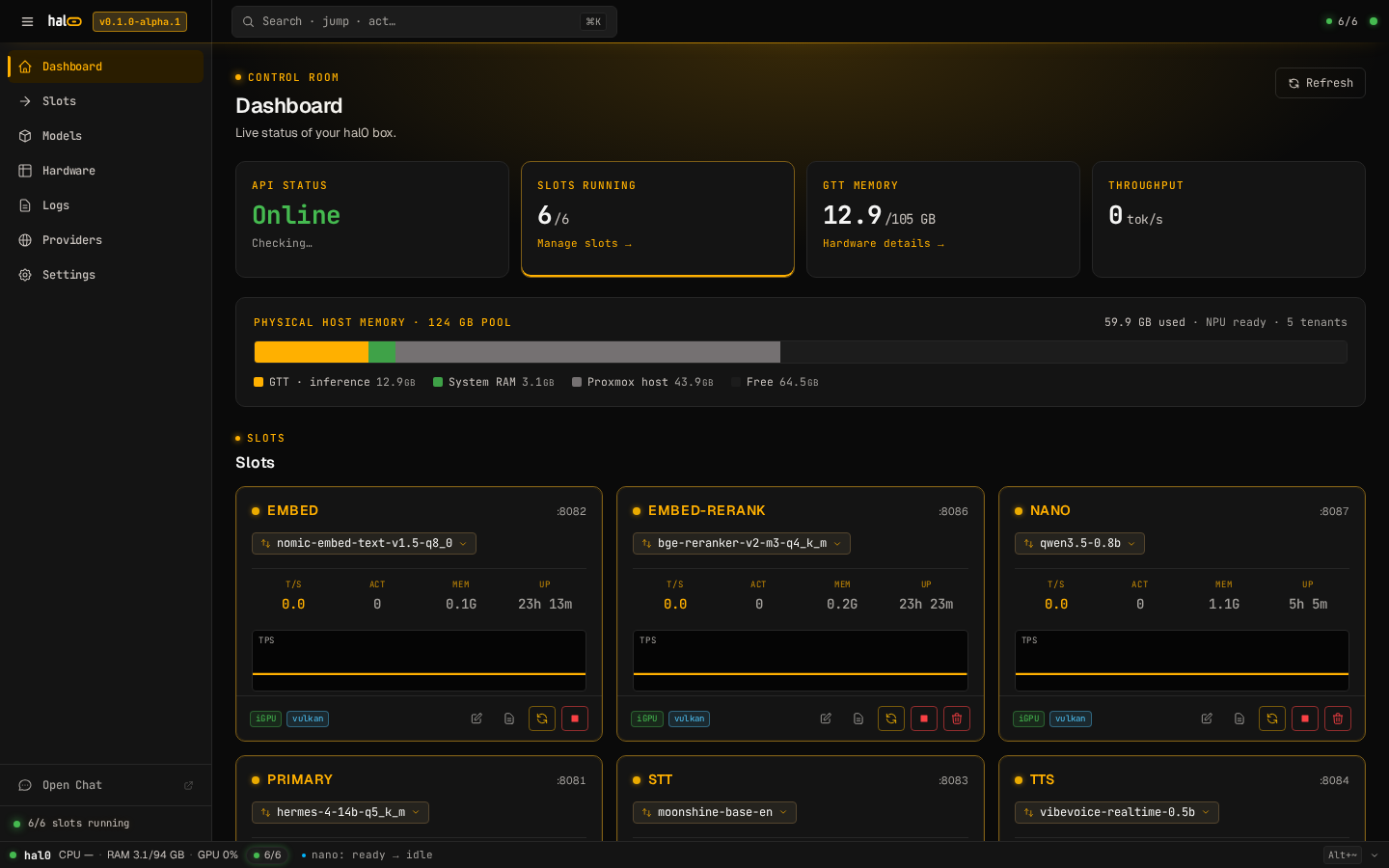
KPIs across the top, the unified-memory bar in the middle (with the Proxmox host segment when a PVE token is configured), the slot grid below with per-slot T/S, ACT, MEM, and uptime. SSE keeps the numbers honest; systemctl is-active is the floor, not the ceiling.

hal0 dashboard at root path showing API and slot KPIs, the unified-memory bar with a Proxmox host segment, and the slot grid below.
Dashboard at /. The memory bar accounts for the LXC's GTT pool, the host's other PVE tenants, and free unified memory.

Hardware

Strix Halo is the reference. The rest of the matrix is honest.

Linux + systemd is the only hard requirement (installer/install.sh:86). The probe picks the right provider; you don't pin a backend by hand.

Provider matrix — picked automatically by the hardware probe

Hardware Vendor Unified / VRAM Support Notes
AMD Ryzen AI Max+ 395 AMD · "Strix Halo" Unified 128 GB first-class Reference deployment. iGPU + XDNA NPU + UMA-aware probe. Vulkan default; FLM for NPU.
AMD Ryzen AI Max 385 / 390 AMD · "Strix Halo" Unified 64 GB first-class Same path as the 128 GB SKU; small + mid tiers fit comfortably, 70B Q4 with shorter context.
NVIDIA RTX 30/40/50 NVIDIA 10–32 GB supported CUDA-backed llama.cpp. Same slot lifecycle, dedicated VRAM instead of UMA.
AMD Radeon RX 7000 / discrete AMD 16–24 GB supported Vulkan path today; ROCm toolbox image on the build list for opt-in.
CPU-only x86_64 Intel / AMD System RAM experimental Vulkan-CPU fallback. Small models only. CI runs Qwen 0.5B here. Not the headline experience.

macOS and Windows are not in scope for v1. The FLM NPU provider is live with a self-contained ghcr.io/hal0ai/hal0-toolbox-flm:v1 image; NPU benchmarks land once the manifest digest pin lands in hal0/manifest.json.

Recommended loadouts

Three starting points. Mix, match, swap.

Curated picks for the 128 GB Strix Halo — refreshed to the latest open-weight releases as of May 2026. The slot system takes a different model per slot whenever you change your mind. See the full hardware page for discrete-GPU and CPU loadouts.

Coding · mid

~19 GB
  • primary · Qwen3-Coder-30B-A3B-Instruct-Q4_K_M
  • embed · nomic-embed-text-v2-moe-Q4_K_M

MoE with 3B active params. Runs near 3B speeds, reasons like a 30B. Pairs with a 140 MB embed for repo-aware search.

Voice mode

~3 GB
  • primary · Qwen3-4B-Instruct-2507-Q4_K_M
  • stt · Moonshine base
  • tts · Kokoro-82M v1.0

Low-latency reply, edge-built STT, 54-voice TTS. 128 GB leaves the entire rest of the budget free for a second chat model warm in another slot.

Maxed-out · long context

~50 GB
  • primary · Llama-4-Scout-17B-16E-Instruct-Q4_K_M
  • embed · bge-m3 (8192-token context)

10M-token context, MoE with 17B active. The biggest realistic single-model loadout that still leaves room for STT/TTS slots warm on 128 GB unified.

Loadouts are starting points. Every real install ends up tweaked. Sizes are published GGUF file sizes (Hugging Face, May 2026); no tok/s numbers on this page.

Quickstart

From zero to a live /v1/chat in two commands.

The installer is idempotent and non-interactive. It probes the hardware, writes /etc/hal0/hardware.json, drops working slot defaults, and brings the API up on :8080.

1 · install

install.sh
sh
# install on any modern Linux box with systemd
curl -fsSL https://hal0.dev/install.sh | bash

# optional overrides
# HAL0_PORT=9090 HAL0_PREFIX=/opt/hal0 curl … | bash

2 · chat

/v1/chat/completions
sh
curl http://localhost:8080/v1/chat/completions \
  -H "Content-Type: application/json" \
  -d '{
    "model": "qwen2.5-0.5b-instruct-q4_k_m",
    "messages": [{"role":"user","content":"Hello!"}]
  }'

Prefer a chat UI? OpenWebUI ships prewired on :3001, pointed at the local hal0 API out of the box.

Comparison

Where hal0 sits next to ollama, LM Studio, and raw llama.cpp.

hal0 isn't an inference engine. It's the orchestration, lifecycle, and multi-modal surface around llama.cpp, FLM, Moonshine, and Kokoro. Honest take, in one table.

Feature hal0 ollama LM Studio raw llama.cpp Cloud API
OpenAI /v1/* surface chat, embed, rerank, STT, TTSchat-only subsetchat-onlyraw HTTPfull
systemd-managed lifecycle partialdesktop appDIYn/a
Hardware probe + fit warnings n/a
Headless one-line install GUI installermanualn/a
Multi-model concurrent slots partial DIY
Bundled chat UI OpenWebUI prewired built-in varies
Signed self-update + rollback cosignmanualdesktop updatermanualn/a
Data stays on your box

vs. ollama. systemd-managed slots survive hal0-api restarts. The OpenAI surface includes embeddings, rerank, and STT/TTS, not only chat. Hardware probe and slot fit warnings are first-class.

vs. LM Studio. Linux-first, headless-first, one-line install, no GUI required. Prewired OpenWebUI handles chat; the dashboard is for operating the box.

vs. raw llama.cpp. hal0 owns the lifecycle: health probes, atomic env writes, cold-boot grace, single-flight prefetch, structured errors, signed self-update with rollback.

vs. cloud APIs. Your hardware, your data, your models. External upstreams (OpenRouter, Anthropic, OpenAI, custom) can be configured as fallbacks behind the same /v1/* surface, so you can mix local and remote per-model in one config.

Roadmap

v1 shipped. v0.2 is where it gets interesting.

Phase 1 landed on 2026-05-15 with 353 unit tests passing and the integration tier on Vulkan-CPU + Qwen 0.5B. Here's what's next.

Full roadmap →

Now

v1

Capability slots overlay

shipped

v1

Embed / Voice / Img cards + NPU backend rollup, backed by /etc/hal0/capabilities.toml and GET|POST /api/capabilities/*. Drift between capabilities.tomlslots/*.toml reconciles on every apply.

FLM NPU live

shipped

v1

Self-contained ghcr.io/hal0ai/hal0-toolbox-flm:v1 image. Chat + embed surfaced in the picker when XDNA and the toolbox image are both present; model namespace from flm list -j.

Image generation

shipped

v1

POST /v1/images/generations served by ComfyUI on ROCm. Curated SDXL Turbo / SD 1.5 / Flux Schnell, slot named img.

First-run wizard

shipped

v1

Eight linear steps from password through hardware, capabilities, conditional HF token, license, install, done. Legacy 5-step picker and three IA prototypes deleted.

Next

v0.2

Hugging Face model pulls

next
POST /api/models/{id}/pull streaming download is still 501. (FLM-aware pull for NPU tags landed in PR #89.)

Memory subsystem

next
Conversation memory store wired into the dispatcher, opt-in per slot.

MCP support

next
Model Context Protocol surface so hal0 can host MCP servers alongside slots.

Packaging

v0.2

AUR + Ubuntu PPA

next
Distro-native packages alongside the curl installer.

Benchmarks + Presets UI

next
In-dashboard benchmark runner and one-click loadout presets.

Trust

Boring guarantees, in writing.

License

Apache-2.0

Patent grant included. Bundle, fork, ship.

Telemetry

Off by default

Opt-in surfaces hw class, version, slot count. No model names. No IPs. No config.

Releases

cosign-signed

hal0 update verifies GitHub-OIDC signer identity before unpacking.

Source

github.com/hal0ai/hal0 →

Issues, discussions, release manifests. Pre-alpha; see CONTRIBUTING for contribution status.

One Linux box. Your AI.

Install hal0 in under a minute.

Linux + systemd is the only hard requirement. The probe picks the right provider for you: Vulkan on Strix Halo, CUDA on NVIDIA, ROCm on AMD discrete, CPU as a fallback.