hardware

Hardware compatibility.

hal0 runs a hardware probe at install time, writes the result to /etc/hal0/hardware.json, and picks the right provider per slot automatically. Vulkan-backed llama.cpp is the universal baseline that every install gets out of the box. ROCm, CUDA, and the AMD XDNA NPU (FLM) layer on top where the hardware supports them. Moonshine STT stays on CPU because upstream useful-moonshine-onnx ships an ONNX Runtime CPU EP only, so the picker pins its runtime fan-out to ("cpu",) and never advertises a backend the slot can’t honour.

  • baseline

    llama.cpp · Vulkan

  • opt-in

    llama.cpp · ROCm / CUDA

  • npu

    FLM · AMD XDNA

  • stt

    Moonshine · CPU only

  • tts

    Kokoro · CPU / Vulkan

  • os

    Linux + systemd

tiers

Three tiers, one platform.

First-class is the box hal0 is designed against. Supported is the path every other modern AMD/NVIDIA host takes. Fallback is the CI smoke target, useful for sanity checks but not the headline experience.

first-class llama.cpp · Vulkan + FLM (NPU)

Strix Halo / Ryzen AI Max+

The reference deployment. APU + XDNA NPU + a single unified memory pool. The iGPU carveout is BIOS-tunable up to ~96 GB on 128 GB SKUs, and the slot lifecycle and FLM provider were written against this hardware first. FLM is live with a self-contained ghcr.io/hal0ai/hal0-toolbox-flm:v1 image; chat + embed are surfaced in the picker when XDNA and the toolbox image are both present. STT slice deferred.

Verified on Ryzen AI Max iGPU + Vulkan: Qwen 0.5B 217–413 tok/s; Phi-3 Mini Q4 ~71 tok/s, ~280 ms round-trip; concurrent primary + embed ~258 tok/s, <200 ms dispatch. NPU tok/s measurements pending (manifest digest still null).

  • Ryzen AI Max+ 395 (128 GB)
  • Ryzen AI Max 385 / 390 (64 GB)
Strix Halo deep dive →
supported llama.cpp · ROCm / CUDA

AMD discrete · NVIDIA

Same slot lifecycle, same dispatcher, same API surface. What changes is dedicated VRAM in place of the unified pool. AMD discrete uses the hal0-toolbox-rocm image (pending publish); NVIDIA uses the CUDA-backed llama.cpp build. Trade vs. Strix Halo: tighter context budgets at the same model size, no headroom for STT/TTS alongside a 30B primary.

  • RTX 5090
  • RTX 4090 / 4080
  • RX 7900 XTX / XT
Provider details →
fallback llama.cpp · Vulkan-CPU

CPU-only x86_64

What CI runs on with Qwen 0.5B (tests/slots/test_integration.py). Usable for tiny models and dev smoke. Expect a few tok/s on chat, fine for occasional Q&A but not a streaming experience. stt and tts work in theory but want at least an iGPU for usable latency.

  • ≥32 GB RAM
  • no GPU required
Provider details →

matrix

Compatibility matrix.

Status reflects what runs today, not aspirations. Anything off the v1 CI matrix is marked accordingly.

hal0 v1 hardware support

Hardware Vendor Unified / VRAM Support Notes
Ryzen AI Max+ 395 (Strix Halo, 128 GB) AMD ~96–110 GB UMA first-class iGPU + XDNA NPU + unified memory. Reference deployment.
Ryzen AI Max 385 / 390 (Strix Halo, 64 GB) AMD ~48 GB UMA first-class Same providers as 128 GB; tighter ceiling on large models.
AMD discrete (RX 7900 XTX / XT) AMD 16–24 GB supported Vulkan works today; ROCm toolbox image pending publish.
NVIDIA RTX 50 / 40 / 30 series NVIDIA 10–32 GB supported CUDA-backed llama.cpp build. In v1 target list.
CPU-only (x86_64, ≥32 GB RAM) any system RAM supported Vulkan-CPU path; CI smoke tier. Small models only.
Apple Silicon (M-series) Apple UMA planned Linux + systemd required for v1. Not in scope.
Intel Arc / Xe Intel 8–16 GB experimental Vulkan path may work; not on the CI matrix.
Raspberry Pi / ARM SBC various system RAM planned aarch64 builds not part of v1.
first-class
Reference target. Daily-driven and benchmarked.
supported
In v1 scope, on the CI matrix or close to it.
experimental
May work via the universal Vulkan path; not vetted.
planned
Out of scope for v1; on the roadmap.

the honest answer

What about Apple Silicon, Intel Arc, Raspberry Pi?

Apple Silicon (M1 / M2 / M3 / M4)

Not in v1 scope. hal0 hard-requires Linux + systemd (installer/install.sh:86). Slot lifecycle is built on systemd template units, atomic env file writes, and journalctl tailing. macOS doesn’t have systemd, and porting the lifecycle to launchd isn’t on the v1 punch list. If you want hal0 on Apple Silicon today, run it inside an Asahi Linux install or a Linux VM.

Intel Arc / Xe

Experimental via the universal Vulkan path. Mesa’s ANV driver gives llama.cpp-Vulkan something to talk to on Linux, so the primary and embed slots should light up. Intel isn’t on the v1 CI matrix and there’s no daily-driven Arc box on the project. Treat it as "patches welcome, no promises." If you run it, tell us how it goes.

Raspberry Pi / aarch64 / ARM SBCs

Not in v1. The installer is x86_64-only today, and aarch64 builds aren’t on the release matrix. llama.cpp itself runs on a Pi 5; bringing hal0 along would mean cross-building the toolbox images for arm64 and validating the lifecycle there. On the wish list, not the roadmap.

WSL2 / Docker Desktop / cloud VMs

WSL2 doesn’t expose systemd by default, and rootless Docker can’t hold the slot units. A real Linux VM (KVM/QEMU, Proxmox, Hyper-V Gen2) works fine, and a privileged LXC with GPU/NPU passthrough is the canonical homelab shape. See the hal0-test Strix Halo LXC recipe in the docs.

deployment

Honest memory accounting for Proxmox tenants.

A privileged LXC with GPU/NPU passthrough is the canonical homelab shape (AppArmor unconfined, dev0–dev3 + cgroup allows for the render nodes and the XDNA accelerator). Inside that container, hal0 only sees its own cgroup slice of memory. Other tenants, ZFS ARC, and the host kernel pull from the same physical DIMMs as GPU GTT but stay invisible to the container. Drop a read-only PVEAuditor API token into Settings → Proxmox integration and the dashboard's unified-memory bar switches to the physical host total, with a muted Proxmox host segment for the rest of the pressure. Token is stored 0600 at /etc/hal0/proxmox.json; the API redacts it on read. Bare-metal and VM installs leave the panel off and the bar stays quiet.

Unified-memory bar from the hal0 dashboard: GTT inference 12.9 GB, System RAM, Proxmox host, Free segments
Live unified-memory bar from a 128 GB Strix Halo LXC on Proxmox. The Proxmox host segment counts everything outside the container competing for the same DIMMs. Nothing else in this space accounts for co-tenant pressure this way.

what hal0 knows about your box

The hardware view.

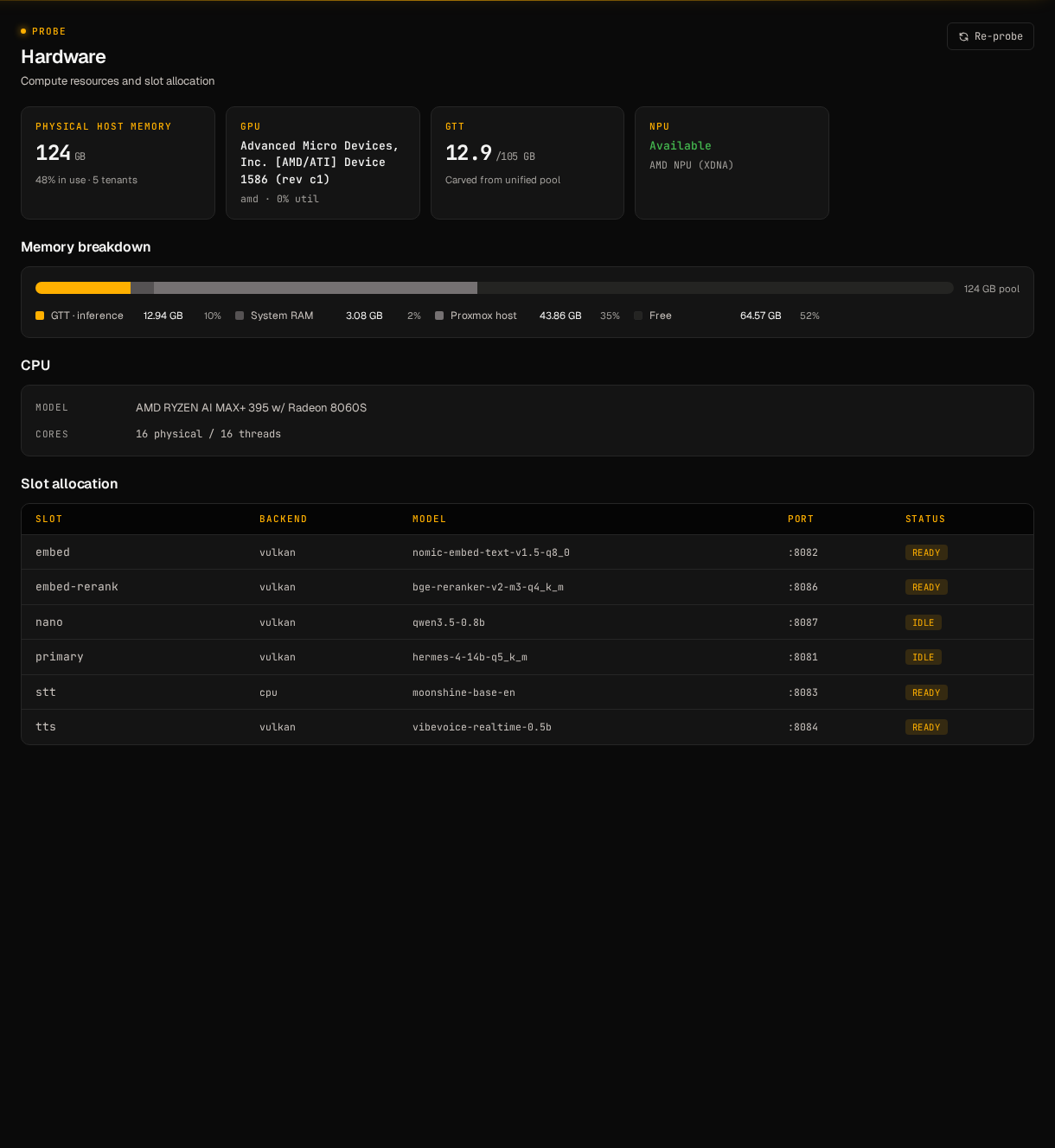
The dashboard surfaces the probe at /hardware: detected APU / dGPU / NPU rows, unified-memory pool sizing, GTT/VRAM carveout, and which capability slots each device can host. Same data as /etc/hal0/hardware.json, rendered the way an operator wants to read it.

The /hardware view in the hal0 dashboard: detected APU / NPU / unified memory pool, capability rows, and probe details
/hardware view on a Strix Halo LXC. Probe output rendered as cards plus the raw JSON one click away.

ready to try it?

One line. Drops cleanly into your homelab.

The installer probes hardware on first run and picks providers automatically: Vulkan baseline, ROCm/CUDA where the card supports it, FLM where the NPU is there.